

Average the Last 3 Values
The formulas in the following examples return an average of the last 3 values in a range of cells.
Without Blank Cells in the Data
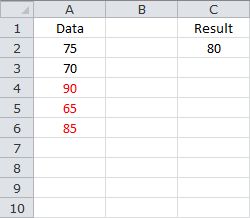
The following formula returns the average of the last 3 values in A2:A10, where the data does not contain blank cells...
=AVERAGE(INDEX(A2:A10,MATCH(9.99999999999999E+307,A2:A10)-3+1):A10)
Based on the sample data, the formula returns 80.
Sample Workbook: Download
With Blank Cells in the Data
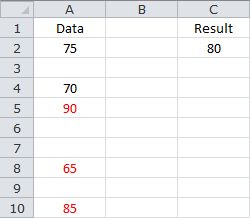
The following formula returns the average of the last 3 values in A2:A10, where the data contains blank cells...
=AVERAGE(INDEX(A2:A10,LARGE(IF(A2:A10<>"",ROW(A2:A10)-ROW(A2)+1),3)):A10)
Note that the formula needs to be confirmed with CONTROL+SHIFT+ENTER. If done correctly, Excel will automatically place curly braces {...} around the formula.
Based on the sample data, the formula returns 80.
Sample Workbook: Download