

Maximum Based on Multiple Criteria
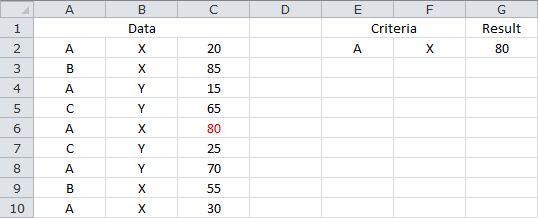
The following formula returns the maximum value from C2:C10, where the corresponding value in A2:A10 equals the value in E2, and the corresponding value in B2:B10 equals the value in F2...
=MAX(IF(A2:A10=E2,IF(B2:B10=F2,C2:C10)))
Note that the formula needs to be confirmed with CONTROL+SHIFT+ENTER. If done correctly, Excel will automatically place curly braces {...} around the formula.
Based on the sample data, the formula returns 80.
Sample Workbook: Download